
Backup classification levels or migrate them between environments.
⚠️ Important: When a Forge app is uninstalled, levels list and level permissions data stored is permanently deleted.
Use the export/import functionality below to backup and restore your classification levels and permissions.
Navigate to Confluence Settings → Classification Levels Management → Export/Import tab.
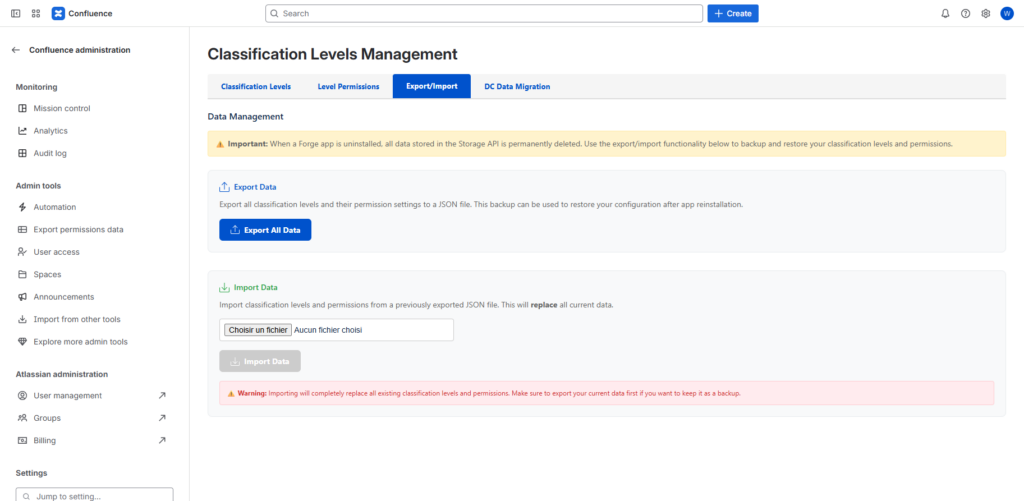
1. Export Classification Levels
Download all your classification levels as an Excel file for backup or migration.
Steps:
- Click Export Classification Levels button
- An Excel file will download automatically containing all classification levels
2. Import Classification Levels
Upload classification levels from an Excel file.
Steps:
- Click Choose File button
- Select your Excel file (.xls or .xlsx)
- Click Import Classification Levels
- Review the import results
⚠️ Important:
- Existing levels with the same name will be updated
- New levels will be added
- Existing levels not in the import file will remain unchanged
- The import does not delete existing levels
- Page classifications will remain intact
Tips:
- Export first to get the correct Excel format
- Validate your Excel file before importing
- Test in a staging environment first
- Make a backup export before importing